Powered by private GPUs · Unlimited tokens

Your Own
AI Instance.
Unlimited Tokens.

An easy-to-use OpenClaw instance with unlimited AI tokens powered by private GPUs. Your always-on cloud workspace with Claude Code, desktop GUI, and full autonomy.

No rate limits. No token caps. No overage fees. Runs on dedicated GPU infrastructure. Connect via WhatsApp, Telegram, Discord, Slack, Signal, or API.

WhatsApp Telegram Discord Signal Slack

$99/mo — unlimited AI tokens powered by private GPUs.

redcrab — cloud instance
agent@redcrab:~$ openclaude "refactor the auth module and add tests"
[*] Reading src/auth/... 12 files analyzed
[*] Extracting middleware into separate module...
[+] Created src/auth/middleware.ts (142 lines)
[+] Created src/auth/__tests__/middleware.test.ts (89 lines)
All 14 tests passing. Ready for review.

Everything you need, always on

A full AI workspace that lives in the cloud — coding, automating, and building around the clock with unlimited tokens.

🔓

Unlimited AI Tokens

Powered by private GPUs with no token metering, no rate limits, and no overage fees. Use as much AI as you need — it's all included.

⚔️

One-Click MCP Deploy

Deploy any MCP server from GitHub in one click — web search, databases, APIs, and 50+ more. Paste a repo URL, deploy to Vercel or Render, and it's live. Instant connection to your instance.

🕵️

Always-On Cloud Workspace

Your instance runs 24/7 in the cloud. Schedule tasks, run background agents, and come back to results — your AI never sleeps.

💬

Operate From Anywhere

Message your agent from Signal, Slack, Discord, Telegram, or WhatsApp. Just tell it what you need — it handles the rest.

🖥️

Cloud Cursor IDE

Full Cursor-like coding experience in the cloud on your own tenant. Edit code, manage configs, and build projects from a browser-based IDE with complete filesystem access.

🤖

Meta-Claw Agent

An AI agent with sudo access that retrofits your OpenClaw instance in real time. Install tools, patch configs, deploy MCP servers, and reconfigure your entire stack — conversationally, from the console.

H100 GPU · Unlimited Tokens

Running on NVIDIA H100 with 80GB VRAM. 128K context window. Flash attention. Fast inference at ~195 tokens/sec. No token limits — use as much as you need.

Unlimited OpenClaude

Unlimited AI coding agent on the Claude Code harness — powered by unlimited AI usage powered by private GPUs, included in your $99/mo. Bring your own API key to swap LLMs anytime. Kairos Mode runs 24/7 on your always-on cloud instance. Personalize your agent easily with Meta-Claw.

📋

Private & Isolated

Each subscriber gets a fully isolated instance. Your data, conversations, and files never mix with other users. Nothing leaves your environment.

🔑

API Access

OpenAI-compatible API endpoint included. Integrate AI into your CI/CD pipeline or build custom automation workflows.

Unlimited AI usage — included in $99/mo

Unlimited Cloud Code with Kairos Mode

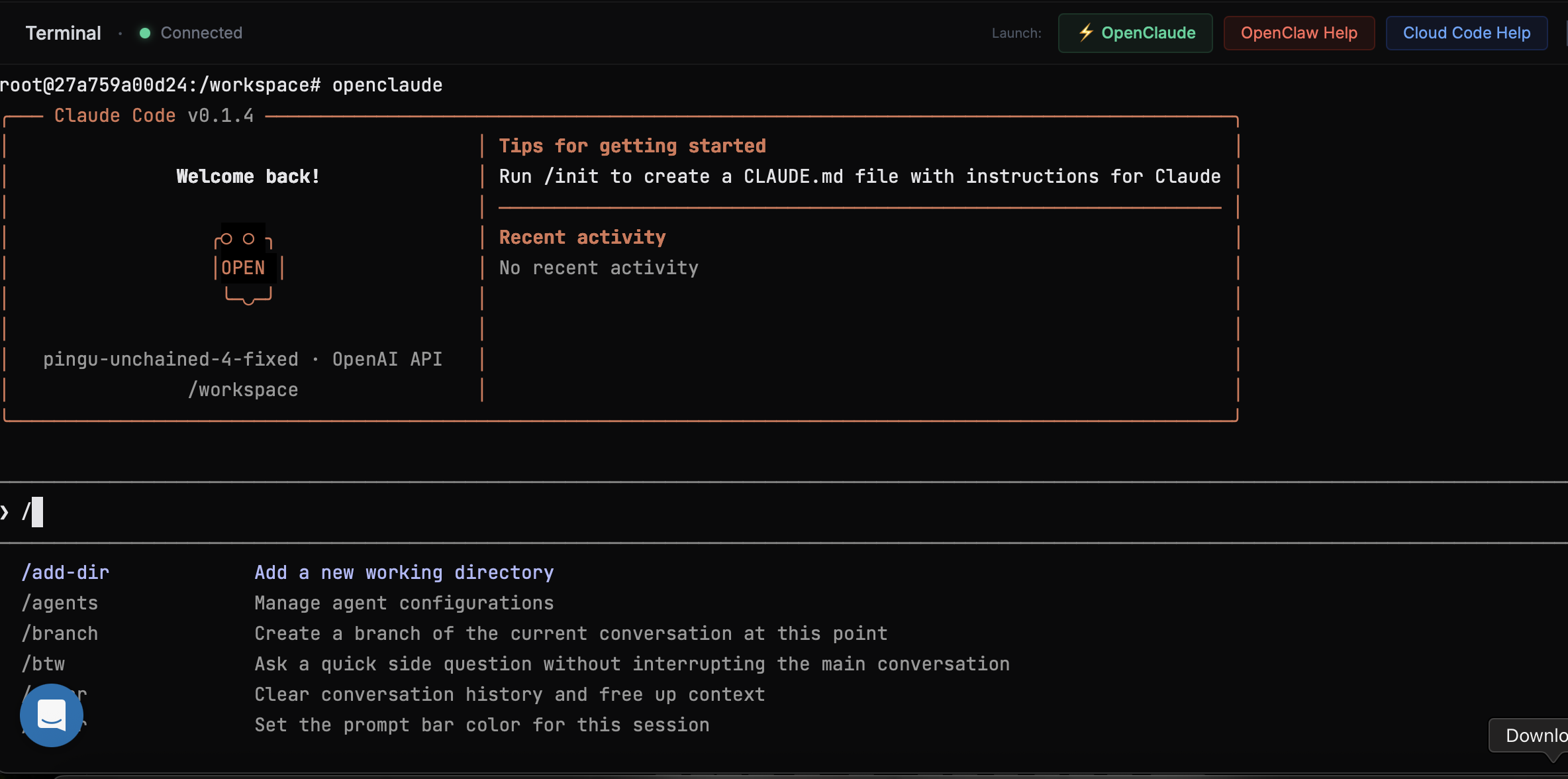
Your RedCrab instance runs 24/7 in the cloud — making it the perfect home for Claude Code's Kairos Mode. An always-on AI coding agent that never sleeps, powered by unlimited tokens on private GPUs.

OpenClaude · Claude Code v0.1.4 24/7 Online
OpenClaude running Claude Code with Kairos Mode — unlimited AI coding agent in the cloud

Unlimited AI Tokens

Unlimited AI usage on the Claude Code harness — no token metering, no caps. Powered by private GPUs, included in your $99/mo fixed price.

🔄

Kairos Mode — 24/7

Claude Code Kairos Mode works perfectly here because your instance runs 24/7 in the cloud. Schedule autonomous tasks, let the agent work overnight, and wake up to results.

🔑

Bring Your Own Key

Want to use a different LLM? Bring your own API key to swap models anytime. Unlimited AI on private GPUs stays available as your default.

🤖

Personalize with Meta-Claw

Use Meta-Claw to customize your OpenClaude instance — install tools, configure settings, and tailor the agent to your workflow, all conversationally.

Subscribe — $99/mo
Streamed directly to your browser

Your Cloud Desktop

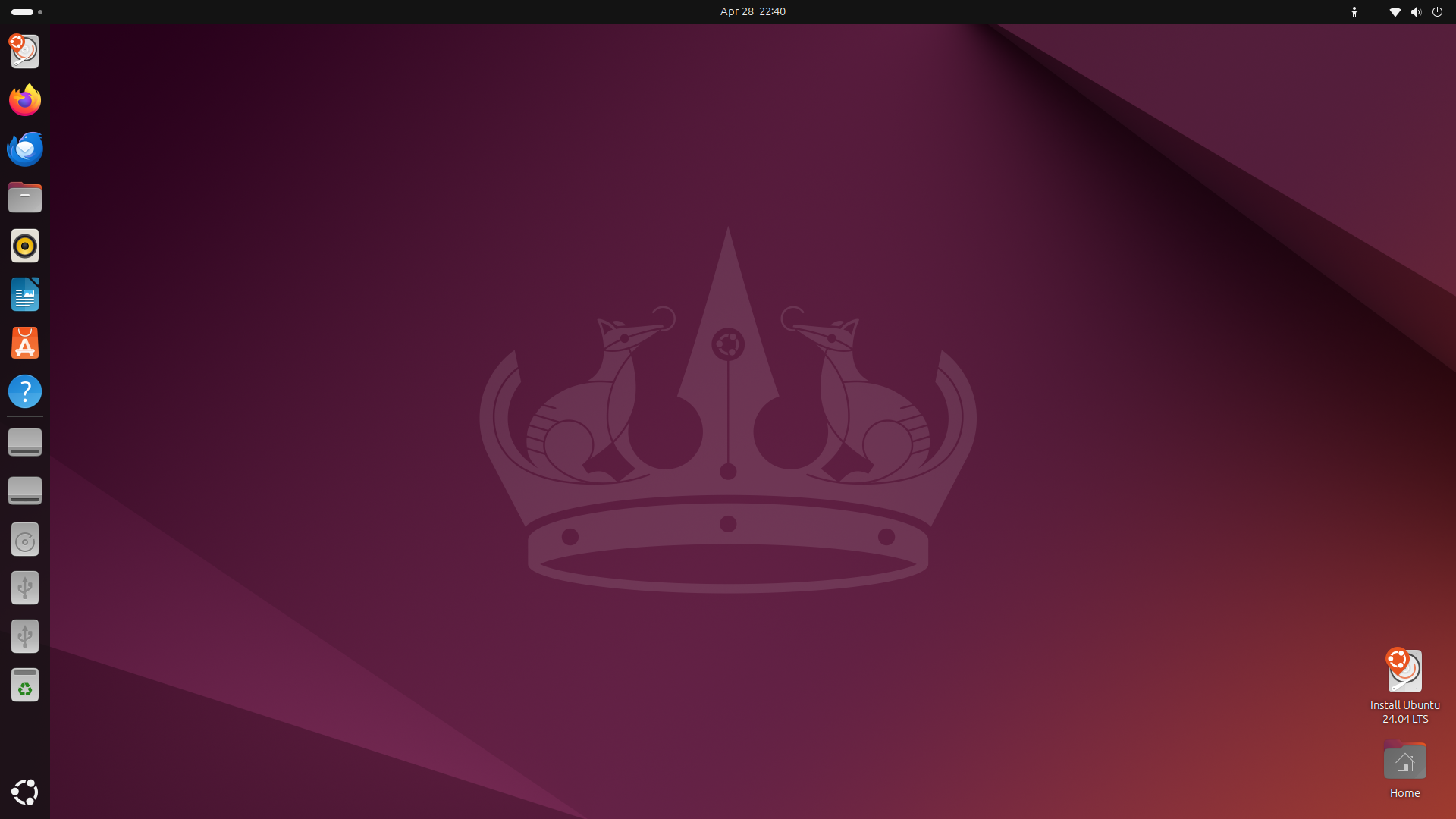
Get a full Linux desktop environment streamed directly to your browser. Run GUI applications, web browsers, file managers, and anything else you need — all in the cloud.

Desktop GUI · Connected Live
RedCrab Cloud Desktop — full Linux GUI in the browser
🖥️

Full Linux Desktop

🚀

No GPU Required

🛠️

Run GUI Tools

🌐

Browser Included

🤖

OpenClaw Uses the GUI

OpenClaw shows you what it's doing — it operates the cloud desktop alongside you in real time. When it needs your help resolving CAPTCHAs or confirming actions, it notifies you directly.

Subscribe — $99/mo

All included — unlimited OpenClaude, Claude Code Kairos Mode, terminal, file editor, desktop GUI, and all MCP tools. BYOK to swap LLMs.

50+ MCP servers in registry

MCP & Skills Marketplace

Pre-loaded MCP servers ready to install. Or deploy any MCP repo from GitHub in one click — instant connection to your instance.

🔍

Web Search

Search

🧠

Supermemory

Memory

🗄️

Postgres

Database

📊

GitHub

Developer

📦

MCP Manager

Utility

🤖

AI Models

AI

🌐

Brave Search

Search

📝

Notion

Productivity

💬

Slack

Channels

🎨

Image Gen

Media

☁️

AWS

Cloud

🔧

Docker

DevOps

Deploy Any MCP from GitHub

Found an MCP server on GitHub? Paste the repo URL and deploy it to Vercel or Render in one click. No config, no Docker — it just works.

Your Cloud AI Stack

🖥️

Cloud Desktop GUI

Full Linux desktop streamed to your browser. Run GUI tools, browsers, and file managers. OpenClaw operates it alongside you.

📝

Cursor IDE in the Cloud

Full coding environment on your own tenant. Edit files, write scripts, manage configs from a browser-based IDE.

🖳

Web Console

Full terminal access to your instance. Run tools, inspect logs, execute commands — all from the browser.

🤖

Meta-Claw Agent

An AI agent with sudo that retrofits your OpenClaw instance. Install packages, deploy MCPs, patch configs — conversationally.

Unlimited OpenClaude

Unlimited AI coding agent on the Claude Code harness powered by private GPUs. Kairos Mode runs 24/7 on your cloud instance. BYOK to swap LLMs. Personalize with Meta-Claw.

📦

Skills Marketplace

50+ pre-loaded MCP servers. One-click install for hosted servers. One-click deploy for self-host repos.

How One-Click Deploy Works

1

Find MCP on GitHub

Any MCP server repo

Paste URL at Audn.AI

pingu.audn.ai/mcp

Deploy to Vercel/Render

One click, no config

Paste URL in RedCrab

Instant connection

Your AI, your rules

Built for builders. Ready for anything.

RedCrab is a full cloud AI workspace. Your agent starts with a clean slate — it asks who you are and what you need. Automate workflows, run bots, build agents, code projects — it's your machine.

Here's what people have already built:

🚀

Ship a Full-Stack App Overnight

Kairos Mode + Claude Code

Set up a full-stack project with Claude Code, kick off Kairos Mode before bed, and wake up to a working app with tests, docs, and deployment configs.

Done via OpenClaude on /console orchestrating the OpenClaw instance for multi-subagent kickoff. Your always-on cloud instance makes Kairos Mode work perfectly — the agent never stops.

💼

Auto LinkedIn Job Applier

Computer Use + Desktop GUI

Using Computer Use on the cloud desktop, we ran a LinkedIn job applier bot that browses, fills forms, and submits applications autonomously. Point it at job listings and let it work.

𝕏

AI X/Twitter Account Manager

Live at @audn_ai

A Grok-like AI responder that monitors mentions, answers questions, manages threads, and posts updates autonomously. Has per-user personal memory — remembers who you are across conversations.

🤖

Reddit Comment & Post Bot

Autonomous engagement

Reddit didn't exactly allow this — we built it anyway. Posts, comments, engages in threads, and works exactly like the X bot. Same personal memory system, same autonomous operation.

🚀

Your imagination?

You can obviously do so many things with this. An always-on cloud instance with unlimited AI, computer use, a full desktop, and a Claude Code harness — the possibilities are endless.

Email us or tap the blue chat button on the bottom left and tell us what you're building. We'll list your use case right here.

Start Building — $99/mo

Simple pricing

One plan. Full access. Unlimited OpenClaude. No hidden fees.

Private GPU Infrastructure

Dedicated compute for your AI

Unlimited AI Tokens

No metering, no surprises

🔒

Fully Isolated Instance

Your data stays private

Pro
$99 /mo

Everything. Unlimited tokens. Private GPUs. Full autonomy.

  • Unlimited AI tokens — no metering
  • Private GPU infrastructure — fast inference
  • Dedicated instance · 128K context window
  • Signal, Slack, Discord, Telegram, WhatsApp
  • Full configuration dashboard
  • OpenAI-compatible API endpoint
  • Unlimited OpenClaude on Claude Code harness
  • Claude Code Kairos Mode — 24/7 always-on agent
  • BYOK — bring your own API key to swap LLMs
Subscribe Now

$99/mo. Cancel anytime.

$99/mo — unlimited AI tokens powered by private GPUs.

FAQ

What is RedCrab?
RedCrab is your own AI cloud instance with unlimited AI tokens powered by private GPUs. No token metering, no usage caps. Includes unlimited OpenClaude on the Claude Code harness. Kairos Mode works out of the box since your instance runs 24/7 in the cloud — personalize it easily with Meta-Claw. Bring your own API key to swap LLMs anytime. You operate it through Signal, Slack, Discord, Telegram, or WhatsApp.
What's free vs. what costs money?
Free: All marketplace skills, hosted MCP servers (Supermemory, Web Search), and the MCP Server Manager are free to use with your subscription. For self-host MCP servers that need deployment, you get one-click deployment on Render-managed infrastructure. Your $99/mo RedCrab subscription covers the AI instance, unlimited tokens, and all built-in skills.
How do I connect my messaging apps?
After subscribing, your dashboard lets you configure channel connections. Add your Signal, Slack, Discord, Telegram, or WhatsApp credentials. Each channel is isolated to your instance — just message the agent and start working.
Is my data private?
Yes. Each subscriber gets an isolated RedCrab instance. Your conversations, files, and data never mix with other users. The model runs locally on our infrastructure — nothing is sent to third-party APIs.
How do I get the most out of RedCrab?

1. Install Featured MCP Servers — Start with the featured items in the Marketplace: Supermemory (free, persistent memory for the agent), MCP Server Manager (free, manage all your MCP connections), and Web Search (free, search the web). These are one-click installs and give you the core toolkit.

2. Use Supermemory for Persistence — Install Supermemory so your agent remembers previous conversations, projects, and context across sessions. This builds a knowledge base that makes your agent smarter over time.

3. Try Kairos Mode — Your instance runs 24/7, making it perfect for Claude Code's Kairos Mode. Schedule autonomous tasks, let the agent work overnight, and wake up to results.

4. Connect Your Channels — Set up WhatsApp, Telegram, Discord, Slack, or Signal so you can message your agent from anywhere. Each channel is isolated to your instance.

5. Deploy More MCP Servers — Browse the marketplace for 50+ MCP servers. Deploy any GitHub MCP repo in one click from the marketplace.

Can I integrate it into my CI/CD pipeline?
Absolutely. Your instance exposes a standard OpenAI-compatible API. Use it to run automated AI tasks on every deploy, integrate into GitHub Actions, or build custom automation workflows.

Ready for your own AI instance?

Deploy your own AI cloud workspace with unlimited tokens powered by private GPUs in under 60 seconds. Operate it from any channel.

Subscribe — $99/mo

$99/mo — unlimited AI tokens powered by private GPUs.